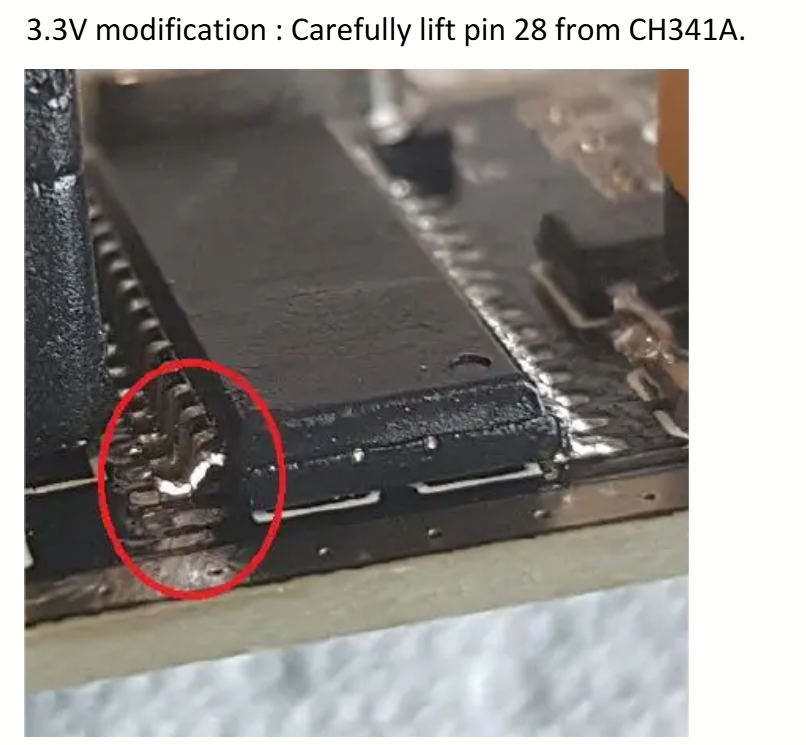
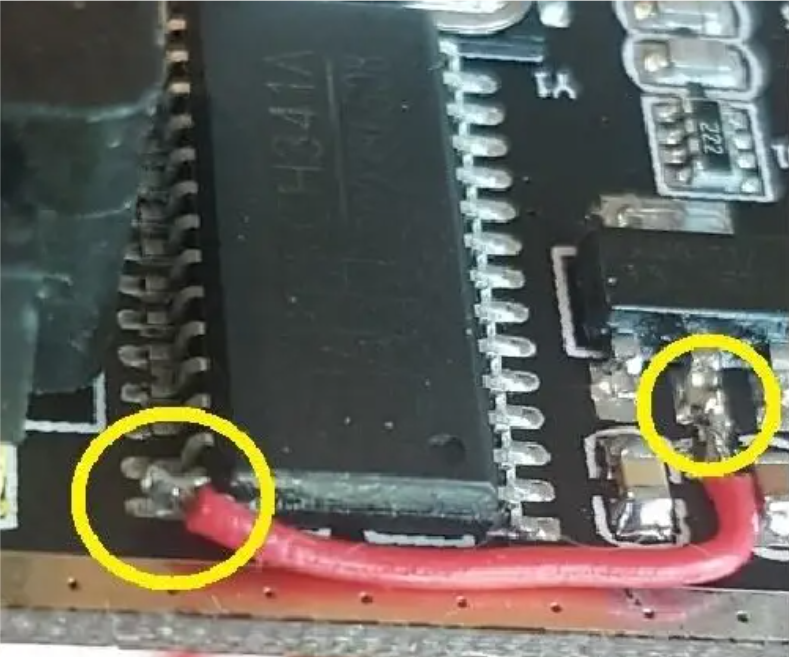
LG AI리모컨허브 IRHG-01

MT7620A – 580MHz MIPS 2T2R 802.11n platform for N300/AC750/AC1200 router and repeater  https://www.mediatek.com/products/home-networking/mt7620n-a

MX25L256 –

ABOV MC96FR3128R – M8051

AT45DB021E – FLASH 2MBIT SPI 70MHZ

ZM5101A – IC RF TXRX+MCU Z-WAVE 56QFN


U-Boot 1.1.3 (Feb 8 2019 – 13:50:02)

Board: Ralink APSoC DRAM: 128 MB
relocate_code Pointer at: 87fb8000
enable ephy clock…done. rf reg 29 = 5
SSC disabled.
spi_wait_nsec: 29
spi device id: c2 20 19 c2 20 (2019c220)
find flash: MX25L25635E
raspi_read: from:30000 len:1000
============================================
Ralink UBoot Version: 4.4.0.0
——————————————–
ASIC 7620_MP (Port5<->None)
DRAM component: 1024 Mbits DDR, width 16
DRAM bus: 16 bit
Total memory: 128 MBytes
Flash component: 32 MBytes NOR Flash
Date:Feb 8 2019 Time:13:50:02
============================================
icache: sets:512, ways:4, linesz:32 ,total:65536
dcache: sets:256, ways:4, linesz:32 ,total:32768

##### The CPU freq = 580 MHZ ####
estimate memory size =128 Mbytes

=================================================
Current Boot Partition: 0
raspi_read: from:60000 len:40
Image0 Header Magic Number –> OK
Image0 Data Checksum –> raspi_read: from:60040 len:cd9768
OK
Image Partition: 0 broken:0, Next Partition:0, broken:0

Please choose the operation:
2: Load system code then write to Flash via TFTP.
3: Boot system code via Flash (default).
9: Load U-Boot code then write to Flash via TFTP. 0

3: System Boot system code via Flash.
## Booting image at bc060000 …
raspi_read: from:60000 len:40
Image Name: irhg-01_v2.04.18
Image Type: MIPS Linux Kernel Image (lzma compressed)
Data Size: 13473640 Bytes = 12.8 MB
Load Address: 80000000
Entry Point: 803bea70
raspi_read: from:60040 len:cd9768
Verifying Checksum … OK
Uncompressing Kernel Image … OK
No initrd
## Transferring control to Linux (at address 803bea70) …
## Giving linux memsize in MB, 128

Starting kernel …

LINUX started…

THIS IS ASIC
Linux version 3.10.14 (gili@gili-870Z5G-880Z5F) (gcc version 4.6.3 (Buildroot 2012.11.1) ) #104 Thu Dec 26 11:13:48 KST 2019

The CPU feqenuce set to 580 MHz
PCIE: bypass PCIe DLL.
PCIE: Elastic buffer control: Addr:0x68 -> 0xB4
disable all power about PCIe
CPU0 revision is: 00019650 (MIPS 24KEc)
Software DMA cache coherency
Determined physical RAM map:
memory: 08000000 @ 00000000 (usable)
Initrd not found or empty – disabling initrd
Zone ranges:
Normal [mem 0x00000000-0x07ffffff]
Movable zone start for each node
Early memory node ranges
node 0: [mem 0x00000000-0x07ffffff]
Primary instruction cache 64kB, 4-way, VIPT, linesize 32 bytes.
Primary data cache 32kB, 4-way, PIPT, no aliases, linesize 32 bytes
Built 1 zonelists in Zone order, mobility grouping on. Total pages: 32512
Kernel command line: console=ttyS1,115200n8 root=/dev/ram0 console=ttyS1,115200n8 root=/dev/ram0
PID hash table entries: 512 (order: -1, 2048 bytes)
Dentry cache hash table entries: 16384 (order: 4, 65536 bytes)
Inode-cache hash table entries: 8192 (order: 3, 32768 bytes)
Writing ErrCtl register=00009c6a
Readback ErrCtl register=00009c6a
Memory: 111048k/131072k available (3866k kernel code, 20024k reserved, 1190k data, 13628k init, 0k highmem)
NR_IRQS:128
console [ttyS1] enabled
Calibrating delay loop… 385.02 BogoMIPS (lpj=770048)
pid_max: default: 32768 minimum: 301
Mount-cache hash table entries: 512
Performance counters: mips/24K PMU enabled, 2 32-bit counters available to each CPU, irq 0
devtmpfs: initialized
NET: Registered protocol family 16
RALINK_GPIOMODE = 1a311c
RALINK_GPIOMODE = 18311c
PPLL_CFG1=0xe74000
MT7620 PPLL lock
PPLL_DRV =0x80080504
start PCIe register access
RALINK_RSTCTRL = 2400000
RALINK_CLKCFG1 = 75afffc0

*************** MT7620 PCIe RC mode *************
PCIE0 no card, disable it(RST&CLK)
PCIE0 enabled
Port 0 N_FTS = ffffffff
init_rt2880pci done
bio: create slab <bio-0> at 0
SCSI subsystem initialized
usbcore: registered new interface driver usbfs
usbcore: registered new interface driver hub
usbcore: registered new device driver usb
PCI host bridge to bus 0000:00
pci_bus 0000:00: root bus resource [mem 0x20000000-0x2fffffff]
pci_bus 0000:00: root bus resource [io 0x10160000-0x1016ffff]
pci_bus 0000:00: No busn resource found for root bus, will use [bus 00-ff]
cfg80211: Calling CRDA to update world regulatory domain
Switching to clocksource Ralink Systick timer
NET: Registered protocol family 2
TCP established hash table entries: 1024 (order: 1, 8192 bytes)
TCP bind hash table entries: 1024 (order: 0, 4096 bytes)
TCP: Hash tables configured (established 1024 bind 1024)
TCP: reno registered
UDP hash table entries: 256 (order: 0, 4096 bytes)
UDP-Lite hash table entries: 256 (order: 0, 4096 bytes)
NET: Registered protocol family 1
Load Kernel WDG Timer Module
Load Ralink Timer0 Module
MTK/Ralink EHCI/OHCI init.
squashfs: version 4.0 (2009/01/31) Phillip Lougher
jffs2: version 2.2. (NAND) (ZLIB) (RTIME) (c) 2001-2006 Red Hat, Inc.
msgmni has been set to 216
alg: No test for crc32 (crc32-table)
alg: No test for stdrng (krng)
io scheduler noop registered (default)
Serial: 8250/16550 driver, 4 ports, IRQ sharing enabled
serial8250: ttyS0 at MMIO 0x10000500 (irq = 37) is a 16550A
serial8250: ttyS1 at MMIO 0x10000c00 (irq = 12) is a 16550A
Ralink gpio driver initialized
spidrv_major = 217
i2cdrv_major = 218
brd: module loaded
loop: module loaded
deice id : c2 20 19 c2 20 (2019c220)
numerase: 0
chip sector: 0x00010000, FlashSize: 33554432, erase size: 0x00010000
numerase: 0
chip sector: 0x00010000, FlashSize: 33554432, erase size: 0x00010000
MX25L25635E(c2 2019c220) (32768 Kbytes)
mtd .name = raspi, .size = 33554432 (32M) .erasesize = 0x00010000 (64K) .numeraseregions = 0
Creating 11 MTD partitions on “raspi”:
0x000000000000-0x000002000000 : “ALL”
devNum:0, name(ALL), ftl_cs: FTL header not found.(offset=0x0,max=0x100000)
0x000000000000-0x000000030000 : “Bootloader”
devNum:0, name(Bootloader), ftl_cs: FTL header not found.(offset=0x0,max=0x30000)
0x000000030000-0x000000050000 : “Config”
devNum:0, name(Config), ftl_cs: FTL header not found.(offset=0x0,max=0x20000)
0x000000050000-0x000000060000 : “Factory”
devNum:0, name(Factory), ftl_cs: FTL header not found.(offset=0x0,max=0x10000)
0x000000060000-0x000000e60000 : “Kernel”
devNum:0, name(Kernel), ftl_cs: FTL header not found.(offset=0x0,max=0x100000)
0x000000e60000-0x000000e80000 : “QmsLog”
devNum:0, name(QmsLog), ftl_cs: FTL header not found.(offset=0x0,max=0x20000)
0x000000e80000-0x000000f80000 : “SysLog”
devNum:0, name(SysLog), ftl_cs: FTL header not found.(offset=0x0,max=0x100000)
0x000000f80000-0x000001000000 : “Data”
devNum:0, name(Data), ftl_cs: FTL header not found.(offset=0x0,max=0x80000)
0x000001000000-0x000001020000 : “Config2”
devNum:0, name(Config2), ftl_cs: FTL header not found.(offset=0x0,max=0x20000)
0x000001020000-0x000001e20000 : “Kernel2”
devNum:0, name(Kernel2), ftl_cs: FTL header not found.(offset=0x0,max=0x100000)
0x000001e20000-0x000002000000 : “HomeIoTLog”
devNum:0, name(HomeIoTLog), ftl_cs: FTL header not found.(offset=0x0,max=0x100000)
tun: Universal TUN/TAP device driver, 1.6
tun: (C) 1999-2004 Max Krasnyansky <maxk@qualcomm.com>
ps: can’t get major 253
SMACCR1 — : 0x000064ee
SMACCR0 — : 0xb7c517a3
Ralink APSoC Ethernet Driver Initilization. v3.1 256 rx/tx descriptors allocated, mtu = 1500!
SMACCR1 — : 0x000064ee
SMACCR0 — : 0xb7c517a3
PROC INIT OK!
ehci_hcd: USB 2.0 ‘Enhanced’ Host Controller (EHCI) Driver
ehci-pci: EHCI PCI platform driver
ehci-platform: EHCI generic platform driver
ehci-platform ehci-platform: EHCI Host Controller
ehci-platform ehci-platform: new USB bus registered, assigned bus number 1
ehci-platform ehci-platform: irq 18, io mem 0x101c0000
ehci-platform ehci-platform: USB 2.0 started, EHCI 1.00
hub 1-0:1.0: USB hub found
hub 1-0:1.0: 1 port detected
ohci_hcd: USB 1.1 ‘Open’ Host Controller (OHCI) Driver
ohci-platform ohci-platform: Generic Platform OHCI Controller
ohci-platform ohci-platform: new USB bus registered, assigned bus number 2
ohci-platform ohci-platform: irq 18, io mem 0x101c1000
hub 2-0:1.0: USB hub found
hub 2-0:1.0: 1 port detected
usbcore: registered new interface driver cdc_acm
cdc_acm: USB Abstract Control Model driver for USB modems and ISDN adapters
usbcore: registered new interface driver usb-storage
Ralink APSoC Hardware Watchdog Timer
usbcore: registered new interface driver ushc
nf_conntrack version 0.5.0 (1735 buckets, 6940 max)
ipip: IPv4 over IPv4 tunneling driver
gre: GRE over IPv4 demultiplexor driver
ip_gre: GRE over IPv4 tunneling driver
ip_tables: (C) 2000-2006 Netfilter Core Team
Type=Restricted Cone
arp_tables: (C) 2002 David S. Miller
TCP: cubic registered
NET: Registered protocol family 10
ip6_tables: (C) 2000-2006 Netfilter Core Team
sit: IPv6 over IPv4 tunneling driver
ip6_gre: GRE over IPv6 tunneling driver
NET: Registered protocol family 17
8021q: 802.1Q VLAN Support v1.8
Key type dns_resolver registered
registered taskstats version 1
drivers/rtc/hctosys.c: unable to open rtc device (rtc0)
Warning: unable to open an initial console.
Freeing unused kernel memory: 13628K (804f1000 – 81240000)
Algorithmics/MIPS FPU Emulator v1.5
SSH Password is hiot_B7C5$6918
Password for ‘admin’ changed

##### disable 1st wireless interface #####
rmmod: rt2860v2_ap_net: No such file or directory
rmmod: rt2860v2_ap: No such file or directory
rmmod: rt2860v2_ap_util: No such file or directory
rmmod: rt2860v2_sta_net: No such file or directory
rmmod: rt2860v2_sta: No such file or directory
rmmod: rt2860v2_sta_util: No such file or directory
ifconfig: ioctl 0x8913 failed: No such device
brctl: bridge br0: No such device or address
iptables v1.4.10: can’t initialize iptables table `mangle’: Table does not exist (do you need to insmod?)
Perhaps iptables or your kernel needs to be upgraded.
##### configVIF #####
Raeth v3.1 (Tasklet)

phy_tx_ring = 0x0593b000, tx_ring = 0xa593b000

phy_rx_ring0 = 0x0593c000, rx_ring0 = 0xa593c000
SMACCR1 — : 0x000064ee
SMACCR0 — : 0xb7c517a3
CDMA_CSG_CFG = 81000000
GDMA1_FWD_CFG = 20710000
vconfig: ioctl error for rem: No such device
rmmod: 8021q: No such file or directory
device eth2 entered promiscuous mode
##### config Ralink ESW vlan partition (LLLLW) #####
switch reg write offset=2004, value=ff0003
switch reg write offset=2104, value=ff0003
switch reg write offset=2204, value=ff0003
switch reg write offset=2304, value=ff0003
switch reg write offset=2404, value=ff0003
switch reg write offset=2504, value=ff0003
switch reg write offset=2010, value=810000c0
switch reg write offset=2110, value=810000c0
switch reg write offset=2210, value=810000c0
switch reg write offset=2310, value=810000c0
switch reg write offset=2410, value=810000c0
switch reg write offset=2510, value=810000c0
switch reg write offset=2610, value=81000000
switch reg write offset=2710, value=81000000
switch reg write offset=2604, value=20ff0003
switch reg write offset=2704, value=20ff0003
Special Tag Disabled
switch reg write offset=2610, value=81000000
switch reg write offset=2014, value=10001
switch reg write offset=2114, value=10001
switch reg write offset=2214, value=10001
switch reg write offset=2314, value=10001
switch reg write offset=2414, value=10002
switch reg write offset=2514, value=10001
REG_ESW_WT_MAC_ATC is 0x7ff0002
done.
brctl: iface ra0: No such device
device eth2.1 entered promiscuous mode
br0: port 1(eth2.1) entered forwarding state
ifconfig: ioctl 0x8914 failed: Cannot assign requested address
br0: port 1(eth2.1) entered forwarding state
killall: udhcpd: no process killed
Set: phy[0].reg[0] = 3900
Set: phy[1].reg[0] = 3900
Set: phy[2].reg[0] = 3900
Set: phy[3].reg[0] = 3900
Set: phy[0].reg[0] = 3300
Set: phy[1].reg[0] = 3300
Set: phy[2].reg[0] = 3300
Set: phy[3].reg[0] = 3300
IPv6: ADDRCONF(NETDEV_UP): gre0: link is not ready
IPv6: ADDRCONF(NETDEV_UP): gretap0: link is not ready
IPv6: ADDRCONF(NETDEV_UP): sit0: link is not ready
IPv6: ADDRCONF(NETDEV_UP): ip6tnl0: link is not ready
IPv6: ADDRCONF(NETDEV_UP): ip6gre0: link is not ready
sh: /etc_ro/lighttpd/www/cgi-bin/usb.cgi: not found
sh: /etc_ro/lighttpd/init_server: Permission denied
1970-01-01 00:00:14: (log.c.97) server started
usb 2-1: new full-speed USB device number 2 using ohci-platform
cdc_acm 2-1:1.0: This device cannot do calls on its own. It is not a modem.
cdc_acm 2-1:1.0: ttyACM0: USB ACM device
device eth2.2 entered promiscuous mode
rt2860v2_ap: module license ‘unspecified’ taints kernel.
Disabling lock debugging due to kernel taint

=== pAd = c03c0000, size = 481784 ===

<– RTMPAllocTxRxRingMemory, Status=0
<– RTMPAllocAdapterBlock, Status=0
RX DESC a5afc000 size = 2048
RTMPSetDefaultChannel() : default channel to 1
1. Phy Mode = 9
2. Phy Mode = 9
20-E2P[0x36]:(00),EXT LNA&PA off!
3. Phy Mode = 9
AntCfgInit: primary/secondary ant 0/1
Current Temperature from BBP_R49=0xfffffff2
MCS Set = ff ff 00 00 00
_GRBLOG_APAutoSelectChannel SelectBestChannel 1
Main bssid = 64:ee:b7:c5:17:a1
<==== rt28xx_init, Status=0
0x1300 = 00064300
device tap7 entered promiscuous mode
br0: port 2(tap7) entered forwarding state
device ra0 entered promiscuous mode
br0: port 3(ra0) entered forwarding state
Set_TxPower_Proc::(TxPowerPercentage=100)
Set_TxPreamble_Proc::(TxPreamble=1)
br0: port 3(ra0) entered forwarding state
Set_TxPower_Proc::(TxPowerPercentage=100)


2026-03-22 추가

시간이 나서 살펴보니 bootloader쪽에 부팅방법 선택이 가능했다.

Image Partition: 1 broken:0, Next Partition:1, broken:0

Please choose the operation:
2: Load system code then write to Flash via TFTP.
3: Boot system code via Flash (default).
9: Load U-Boot code then write to Flash via TFTP.

You choosed 4
0
raspi_read: from:50028 len:6

Password For IRhub :
Password is Wrong!!!!
retry input passwd

비밀번호가 설정되어 있었고 비밀번호는 MD5로 해시하여 63A9F0EA7BB98050796B649E85481845 와 비교해보는데….
해시캣으로 좀 돌려보다가 안나와서 그냥 임의로 바꿔서 부트로더 쉘에 진입할 수 있었다.

echo “0x015000:0x015FFF target_sector” > layout.txt
sudo flashrom –programmer ch341a_spi -VV -w target.bin –layout layout.txt –image target_sector -n -N


Password For IRhub : Success Password!!!


4: System Enter Boot Command Line Interface.

U-Boot 1.1.3 (Feb 8 2019 – 13:50:02)
MT7620 # help
? – alias for ‘help’
bootm – boot application image from memory
cp – memory copy
erase – erase SPI FLASH memory
go – start application at address ‘addr’
help – print online help
loadb – load binary file over serial line (kermit mode)
md – memory display
mdio – Ralink PHY register R/W command !!
mm – memory modify (auto-incrementing)
nm – memory modify (constant address)
printenv- print environment variables
reset – Perform RESET of the CPU
rf – read/write rf register
saveenv – save environment variables to persistent storage
setenv – set environment variables
tftpboot- boot image via network using TFTP protocol
version – print monitor version
MT7620 #


# Name Start End Size Size (Human)
1 ALL 0x00000000 0x02000000 0x02000000 32MB
2 Bootloader 0x00000000 0x00030000 0x00030000 192KB
3 Config 0x00030000 0x00050000 0x00020000 128KB
4 Factory 0x00050000 0x00060000 0x00010000 64KB
5 Kernel 0x00060000 0x00E60000 0x00E00000 14MB
6 QmsLog 0x00E60000 0x00E80000 0x00020000 128KB
7 SysLog 0x00E80000 0x00F80000 0x00100000 1MB
8 Data 0x00F80000 0x01000000 0x00080000 512KB
9 Config2 0x01000000 0x01020000 0x00020000 128KB
10 Kernel2 0x01020000 0x01E20000 0x00E00000 14MB
11 HomeIoTLog 0x01E20000 0x02000000 0x001E0000 1.875MB

Hardware Hackers Course content


https://training.brownfinesecurity.com/l/pdp/digital-signal-analysis-for-hardware-hackers

REQUIRED EQUIPMENT (NOT INCLUDED)

Required Equipment to Buy Seperately

Intro to Course

Welcome to Digital Signal Analysis
About Your Instructor: Matt Brown
Lab Setup

Intro to Digital Signals

Basics of Digital Signals
DEMO: Multimeter vs Logic Analyzer vs Oscilloscope
Voltage High or Low: How do we Decide?
DEMO: CMOS Logic Levels
Probing for Digital Signals
Lab Exercise 1: Find the Digital Signal
Lab Exercise 1 Solution

UART

UART Basics
DEMO: Simple UART Decode
Baud Rate
DEMO: Baud Rate Math
Parity & Inverted Logic
Lab Exercise 2: Basic UART
Lab Exercise 2: Solution
Lab Exercise 3: Non-Standard Baud Rate
Lab Exercise 3: Solution

SPI

SPI Basics
DEMO: Simple SPI Decode
SPI Flash Commands
DEMO: Live SPI Flash Read
DEMO: SPI Data Export
Lab Exercise 4: SPI Flash Dump
Lab Exercise 4: Solution

I2C

I2C Basics
DEMO: Simple I2C Decode
Lab Exercise 5: I2C Multi-Device Bus
Lab Exercise 5: Solution

UART TX/RX

UART Interface Interactions
DEMO: Scripting UART Interactions with Python
Lab Exercise 6: Defuse the Bomb UART Game
Lab Exercise 6: Solution

Closing Thoughts & Extra Credit

Closing Thoughts
Extra Credit FW
Lab Exercise 7: UART Pin Entry Timing Attack
Lab Exercise 8: QSPI Flash Read
Lab Exercise 9: UART TX/RX with RTS/CTSr

2025년 24평 지방 아파트 리모델링 비용 정리

2025년 11월 시공내역
공급 24평, 전용 18평

주방 240만원

싱크 2900mm, E0, 가스렌지 미포함, 수전내림
주방만 140, 신발장 개당 50, 2개 100만원 책정, 지인찬스

욕실, 타일 355만원

욕실 한칸, 비철거, 수전포함, 젠다이 작업 포함, 욕조철거, 파티션 안함, 기타선반 안함
앞베란다, 뒷베란다 타일 + 걸레받이 (발코니3제외), 현관타일, 주방타일, 현관줄이기

샤시 540만원

영림프라임, 내측 5개 전부 2중창, 내측 로이유리 적용, 사다리차 포함

벽지 장판 몰딩 365만원

방4개, 주방, 거실,
장판 J플로어 2.4T, 벽지 개나리 실크, 4mm 몰딩, 걸레받이

페인트 (셀프진행)

베란다+방문 4개 페인트, 잡자재(퍼티, 롤러, 붓, 마스킹, 젯소, 바인더 등) 15만원
경첩, 문고리 (각 4개, 6만원)

전기자재 (셀프진행)

콘센트, 스위치, 전선, 분전함커버, 누전차단기 등 12만원
전등, T5, 매립등, 교체 여유분 한개씩 추가주문, 4만원

베란다 드레인, 드레인커버(셀프진행)

앞, 뒤 만원씩, 배송비포함 2.5만원정도 지출
드레인커버는 당근으로 3개 5천원에 구매 개이득

모두 철거, 폐기물 포함비용, 현금가

TCG OPAL로 HW Encryption 해제하기

samsung 970 evo 에 TCG OPAL로 HW Encryption 적용하기

방치하던 970 evo를  방출하기 위해 초기화 하였다.

진행방법으로

Pre Boot Authorization 패스워드 입력창에 “debug” 입력시 쉘 획득 가능

쉘에서 아래 명령어 실행

# sedutil-cli –revertTPer <SID_password> /dev/nvme0n1

혹시 비밀번호 까먹었으면 본체에 붙어있는 라벨에서 PSID를 이용해 초기화 가능.

# sedutil-cli –yesIreallywanttoERASEALLmydatausingthePSID <PSID> /dev/nvme0n1

행복에 관하여

행복은 지나고 나서야 깨닫는 경우가 많다.

아 고등학교 때가 행복했구나..
군인일 때가 좋은 거였구나… 하고 말이다.

그 당시에 느끼기란 쉽지 않다.

왜 그런 걸까.

한 친구의 말로는 과거가 미화되기 때문이라는데, 일리가 있는 말이다.

좋지 않은 기억들은 사라지고 좋은 기억들만 남아서 아름답게만 보이는 걸지도 모른다.

내 생각은 이렇다.

당시의 불안감이나 고민들이 종결 났기 때문이라고.

우리는 항상 선택의 고민과 미래의 불안감에 휩싸여 산다.

대학이든, 취업이든 빨리 그 결말을 알고 싶어 한다.

하지만 걱정했던 미래가 실제로 일어나더라도

종결만 난다면 그 상황에 적응해서 잘 살아가는 우리의 모습을 볼 수 있다.

그리고 그 과정이 꽤 행복했다고 회상할 거다.

그러니 너무 걱정하지 말자.

결국 행복할 테니 말이다.

[출처] 행복에 관하여|작성자 녹황색